Hello, how can we help you?
We have answers for all your questions. Let’s verify all the information to find out where your shipment is.
We have answers for all your questions. Let’s verify all the information to find out where your shipment is.
ReadyView supports single sign-on (SSO) with any SAML 2.0 identity provider, such as Microsoft Entra ID, Okta or Google Workspace. With SSO set up, your team signs in to ReadyView with their company account.
Things to note:
Setting up SSO requires a role with the Manage SAML Configuration permission. See Roles and Permissions in ReadyView.
Step 1 – Add ReadyView to your identity provider:
In ReadyView, navigate to Administration -> Organization -> Settings. The SAML Configuration panel lists the values your identity provider needs, each with a Copy button. Create a SAML application for ReadyView in your identity provider with these values.
| Identity provider field | Value |
|---|---|
| Identifier (Entity ID) | Your organization ID, shown as Identifier in ReadyView |
| Reply URL (ACS URL) | https://readyview-5ff37.firebaseapp.com/__/auth/handler |
| Sign-on URL | Your organization's sign-in link, shown as Sign-on URL in ReadyView. It starts with https://ui.readylinks.io/login?sso=
|
| Name ID | The user's email address (in Microsoft Entra ID: user.mail) |
| Roles (optional) | ReadyView role names in an attribute named role. Microsoft Entra ID sends app roles this way. See Roles and SSO below. |
Step 2 – Set up single sign-on in ReadyView:
No metadata URL? Press Upload metadata file, or enter the details yourself:
| ReadyView field | Value from your identity provider | Name in Microsoft Entra ID |
|---|---|---|
| Entity ID | Your identity provider's entity ID, also called the issuer (not your organization ID) | Microsoft Entra Identifier |
| SSO URL | The sign-in URL | Login URL |
| Certificate | The signing certificate. Paste it or upload the file, in any format | Certificate (Base64) or Certificate (Raw) |
To change the details later, for example when your identity provider rotates its signing certificate, edit the fields and press Apply Changes. To stop using SSO, press Turn off single sign-on.
Step 3 – Sign in with SSO:
Share your sign-in link, the Sign-on URL from Step 1, with your team. The ReadyView application in your identity provider opens the same link.
Limit the Everyone role first. Everyone who joins through SSO gets the Everyone role, which starts with every permission. Before you share the sign-in link, limit it under Administration -> Organization -> Roles. Until you do, ReadyView shows a warning with a Review roles link under SAML Configuration and in the setup dialog. See Roles and Permissions in ReadyView.
The first time someone signs in with SSO, ReadyView adds them to your organization. If their email address already has a ReadyView password, ReadyView asks for it once to connect SSO to their account.
After the first sign-in, members can also sign in at https://ui.readylinks.io: they enter their email address and press Sign In, and ReadyView sends them to the identity provider.
Roles and SSO:
SSO handles sign-in. ReadyView roles decide what each member can do. New members get the Everyone role.
role attribute and removes roles it no longer sends. Only roles that exist in your organization are applied, and roles assigned in ReadyView are never changedTroubleshooting:
ReadyView is a powerful network management tool provided by ReadyLinks, designed to offer a comprehensive and user-friendly interface for monitoring, configuring, and managing your network infrastructure. Whether you are an IT professional managing a large-scale network or a small business owner ensuring smooth operations, ReadyView provides the tools you need to maintain a robust and efficient network.
Key Features:
Benefits:
Use Cases:
Getting Started:
To get started with ReadyView, visit the ReadyView Documentation for detailed information on setup, configuration, and usage. The documentation provides comprehensive guides and reference materials to help you leverage ReadyView for effective network management.
Support:
For additional assistance, visit our Support section or contact our Support Team for personalized help and guidance on using ReadyView.
ReadyView is your go-to solution for efficient and effective network management, providing the tools and insights you need to maintain a high-performing and secure network environment.
Networks are used to geolocate and contain your devices and their configurations. You may create networks prior to receiving ReadyLinks devices.
Log in to ReadyView .
Navigate to the Networks tab in ReadyView and press the + button
Enter the address of the network
Confirm address and other network details
Press Create Network
By default the name of the network is the address selected when the network was created. To change the name.
In the ReadyView dashboard select the network to rename
Go to settings -> General
Add a new name, description, and contact to the network
Press save changes
With ReadyView, you can add role-based access to limit what ReadyView users have access to. This can vary from who can view which networks in an organization to who can reboot a switch. This article walks you through creating and assigning roles and permissions within ReadyView.
Things to note:
By default, all users are placed into the Everyone role. Like any other role, you can change what it has access to — by default, every permission is enabled.
Limit the Everyone role first. Everyone starts with every permission, so every member can do everything until you change it. Before you invite people or turn on single sign-on, edit Everyone to keep only what every member should be able to do, for example with the View Only template, and grant more through other roles.
Users can be added to multiple roles. If a user belongs to two roles where one has a permission disabled and another has it enabled, the user will ultimately have access — the most permissive setting wins.
Roles are ranked from the top down. A member can edit, delete, and assign only the roles at or below the highest role they hold. Drag a rank number, or use the arrows, to change a role's rank.
Only permissions you hold yourself can be granted to, or removed from, a role.
Creating Roles:
To change a role later, including Everyone, press Edit next to it.
Assigning Roles to Users:
You can also give people roles when you invite them under Administration -> Organization -> Team. They get those roles when they join.
Limiting what Roles have access to what networks:
Add at least one role before you make a site private. With no permitted roles, nobody in your organization could open it.
Roles and single sign-on:
If your organization uses single sign-on, your identity provider can assign roles too. See Single Sign-On (SSO) with SAML in ReadyView.
role attribute and removes roles it no longer sends. Only roles that exist in your organization are appliedTroubleshooting:
Creating VLANs through the ReadyView dashboard automatically syncs them across all devices on the network, eliminating the need to manually configure VLANs on individual switches. With our GL-EP series switches, you can even assign an RGB value to each VLAN ID for easy visual identification.
VLAN creation is done at the network level in ReadyView
Create a new VLAN:
Edit existing VLANs:
Deleting VLANs:
Log in to ReadyView using the account created earlier. Navigate to the Add Device page and select the button to add a device or multiple devices. Provide the MAC address of your device/s. Enter a comma separated series of MAC addresses or scan the MAC QR code on your device.
Select Claim to claim the device.
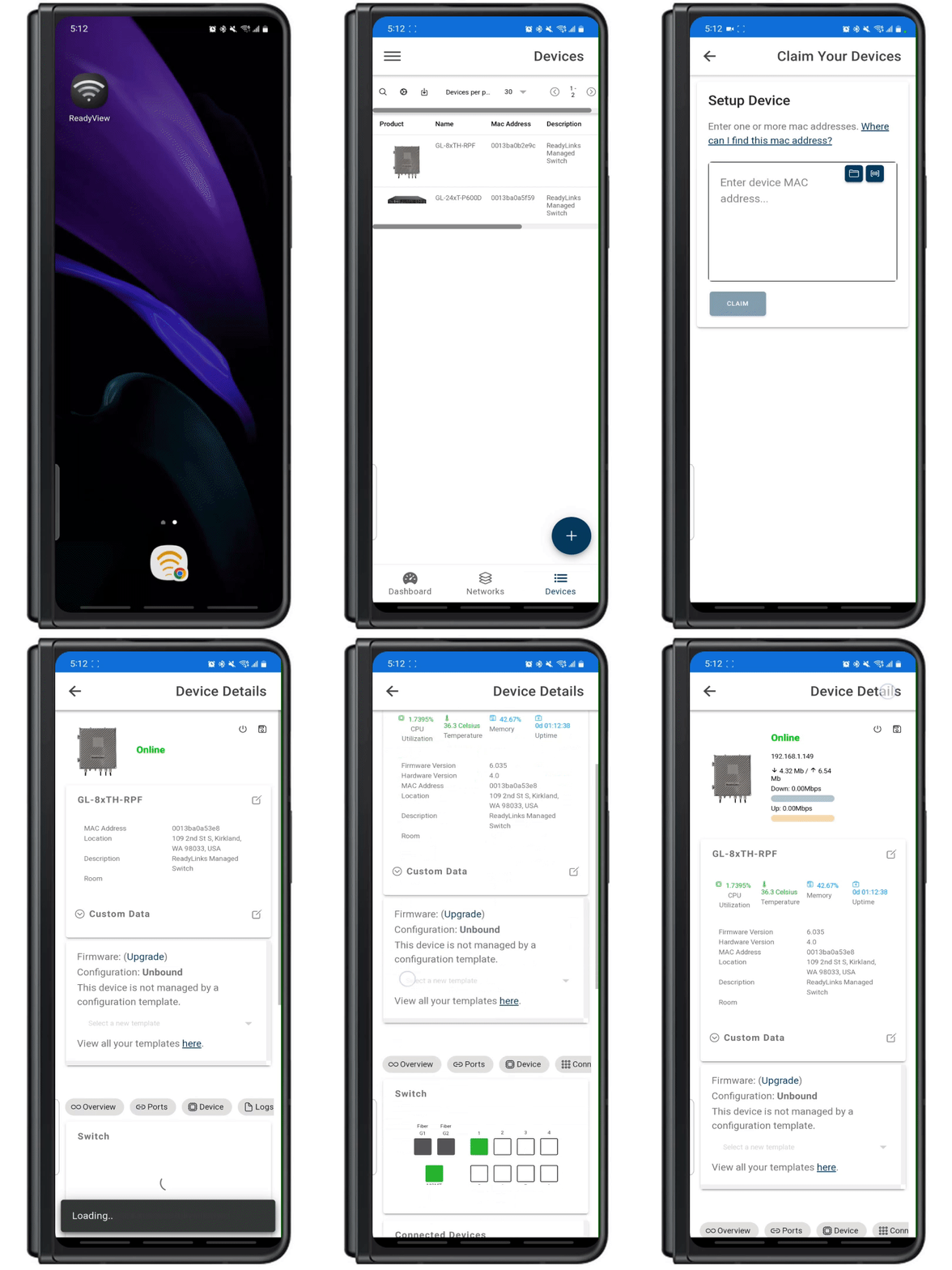
Congratulations! You've successfully claimed your ReadyLinks device.
Troubleshoot: Once the device is powered on and connected, it could take a few minutes for the device to connect back to the ReadyLinks cloud. If you are still having trouble claiming your device. Ensure the device is on a network with proper firewall rules configured.
Whether you are a tech-savvy individual looking to provide better Internet services to your building, a nationwide service provider, or something in between, ReadyOn offers a seamless solution for recognizing revenue from your networks without the cost and complexity of developing your own buy-flow and customer management system.
ReadyOn provides a pre-built, fully customizable ordering flow, enabling you to onboard new subscribers with ease. As your business grows, you can leverage the built-in customer management system to offer the necessary support to your customers.
Key Features:
Pre-Built Ordering Flow:
Customer Management System:
Revenue Recognition:
Data Access and Integration:
Benefits:
Cost-Effective:
Efficiency:
Scalability:
Customer Satisfaction:
Data Control:
Use Cases:
Getting Started:
To get started with ReadyOn, visit the ReadyOn Documentation for detailed information on setup, customization, and integration. The documentation provides comprehensive guides and reference materials to help you maximize the benefits of ReadyOn for your business.
Support:
For additional assistance, visit our Support section or contact our Support Team for personalized help and guidance on using ReadyOn.
ReadyOn simplifies subscriber onboarding and customer management, enabling you to recognize revenue quickly and efficiently while providing excellent support to your customers.
You can sign up on the profile page within ReadyView. On the page there is a section you can click to sign up and create your service provide account. ReadyOn partners with Stripe to provide secure and reliable payment processing.
Here are the things you will need to register as a ReadyOn provider:
Once you are a registered ReadyOn provider, you can start to create networks and enable them to sell your services!
As a ReadyOn provider, you can load serviceable addresses into your networks for your customers to select from at the time of order. Serviceable addresses are a core concept of ReadyOn enabled networks; they represent the addresses where you can provide your service. These are the same addresses that appear for your customers on your ReadyOn buyflow.
Add serviceable addresses
A Customer is a recipient of the services provided by your business. You can create recurring charges and track subscriptions that belong to the same customer.
Customer lookup
Quickly lookup your customer accounts to gather useful information and records.
A Subscription allows you to charge a customer on a recurring basis. A subscription can be assigned to a port of a device in ReadyView to track usage and simplify support.
Assigning a subscription to a device in ReadyView allows you to track specific customer usage and simplify your support tasks.
| trialing | The subscription is currently in a trial period. The subscription transitions automatically to active when the first payment is made. |
|---|---|
| active | The subscription is in good standing and the most recent payment is successful. |
| incomplete | A successful payment needs to be made within 23 hours to activate the subscription. Or the payment requires action, like customer authentication. Subscriptions can also be incomplete if there’s a pending payment. In that case, the invoice status would be open_payment_pending and the payment status would be processing. |
| incomplete_expired | The initial payment on the subscription failed and no successful payment was made within 23 hours of creating the subscription. These subscriptions don’t bill customers. This status exists so you can track customers that failed to activate their subscriptions. |
| past_due | Payment on the latest finalized invoice either failed or wasn’t attempted. The subscription continues to create invoices. Your subscription settings determine the subscription’s next state. If the invoice is still unpaid after all retries have been attempted, you can configure the subscription to move to canceled, unpaid, or leave it as past_due. To move the subscription to active, pay the most recent invoice before its due date. |
| canceled | The subscription has been canceled. During cancellation, automatic collection for all unpaid invoices is disabled. This is a terminal state that can’t be updated. |
| unpaid | The latest invoice hasn’t been paid but the subscription remains in place. The latest invoice remains open and invoices continue to be generated but payments aren’t attempted. Access to your product can be automatically revoked when the subscription is unpaid since payments were already attempted and retried when it was past_due. To move the subscription to active, pay the most recent invoice before its due date. |
A Payment allows you to charge a credit or debit card. You can retrieve and refund individual payments as well as view all payments associated with a customer. Payments are identified by a unique, random ID. You are able to view all payments made by a customer under their customer details page in ReadyView.
The ReadyLinks API provides a comprehensive and flexible interface for integrating and automating the management of ReadyLinks network devices. This API enables developers and network administrators to programmatically access and control various functionalities offered by ReadyLinks, facilitating seamless integration with existing systems and workflows.
Key Features:
Device Management:
Monitoring and Reporting:
User Management:
Network Configuration:
Benefits:
Automation:
Integration:
Scalability:
Flexibility:
Use Cases:
Automated Deployment:
Proactive Monitoring:
Custom Management Tools:
Policy Enforcement:
Getting Started:
To get started with the ReadyLinks API, visit the ReadyLinks API Documentation for detailed information on available endpoints, authentication methods, and usage examples. The documentation provides comprehensive guides and reference materials to help you integrate and utilize the API effectively.
Support:
For additional assistance, visit our Support section or contact our Support Team for personalized help and guidance on using the ReadyLinks API.
The ReadyLinks API is a powerful tool that empowers you to take full control of your network, enabling efficient, scalable, and automated network management.